
Add Umami Stats to Your iPhone Home Screen with Widgets
Published Sep 24, 2026 · 1 min read · Yichen Lab
Most of the time you don't need a full report. You want to know one thing — is traffic normal today? — and a home screen widget answers that without opening an app. SiteGlance's widgets are free and read the same Umami connection you set up in the app; if you haven't done that yet, start with checking Umami on your iPhone.
What the widgets show
- Small: the site, today's visitors, the change versus the previous period, and a small trend line.
- Medium: today's visitors and pageviews, plus a 24-hour wave of visitors by hour with a marker for the current time.
Each widget follows one site. Add several widgets to follow several sites side by side.
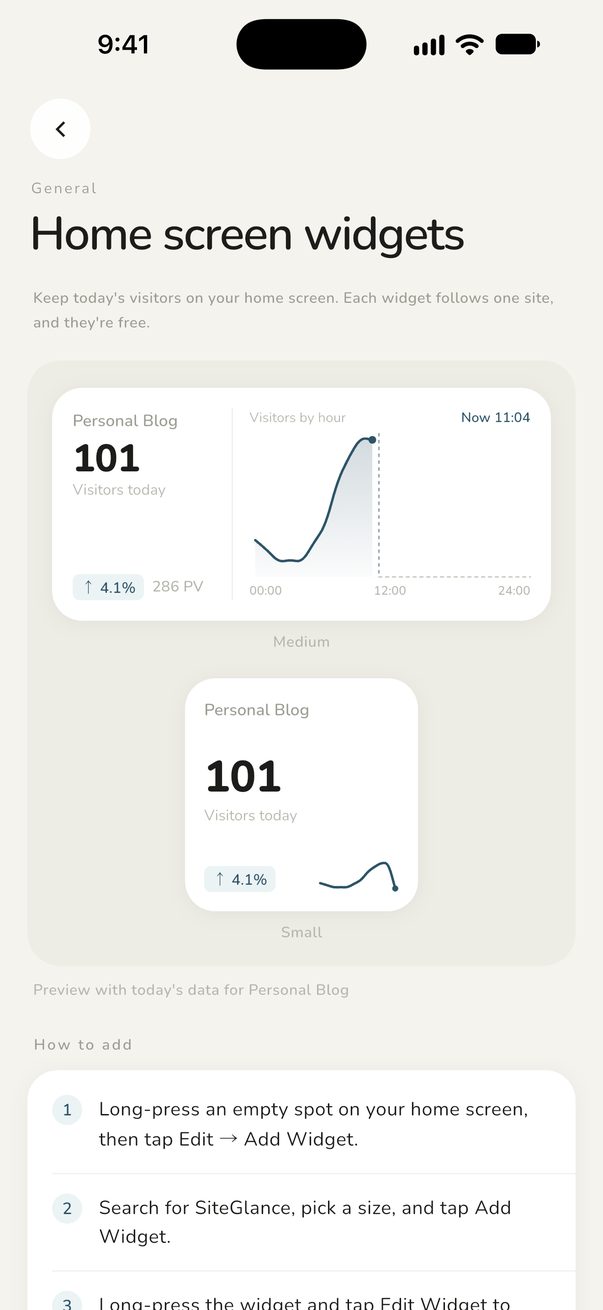
Adding a widget
- Open SiteGlance once after connecting, so it has data to share with the widget.
- Long-press an empty area of the home screen and tap Edit → Add Widget.
- Search for SiteGlance, pick the small or medium size, and tap Add Widget.
- Long-press the new widget, tap Edit Widget, and choose the site it should show.
How often it refreshes
The widget fetches fresh numbers from your Umami on its own, asking iOS for an update about every 15 minutes. iOS decides the exact timing and may space updates out to save battery. Opening the app syncs every widget right away.
Demo mode leaves widgets empty
The in-app demo never writes sample numbers to your home screen. Widgets show real data only, from a real connection.
Widgets work with both self-hosted Umami and Umami Cloud — see how to connect each one.
FAQ
- Are the widgets part of Pro?
- No. Home screen widgets are free.
- Why does my widget show an older number?
- iOS schedules widget updates and may delay them. Open SiteGlance to sync immediately.
- Can one widget show several sites?
- Each widget follows one site. Add more widgets to follow more sites.
Keep reading
- How to Check Umami Analytics on Your iPhoneThree ways to read your Umami stats on an iPhone — mobile Safari, a home screen bookmark, or a native app — and a step-by-step setup for SiteGlance.
- Umami Cloud vs Self-Hosted: How to Connect Each on Your iPhoneUmami Cloud signs in with an API key, self-hosted Umami with a username and password over HTTPS. How each works, and how to fix the common connection errors.